demo videos that show the product: the portfolio-demo skill
why my old portfolio videos didn't work, the skill I wrote so AI plans and reviews demos, and what the frame-by-frame review caught (including a bug in the product itself)
8 minview on github
tl;dr#
the case studies in my portfolio have a short video of each project. the first ones I made were UI tours: they jumped through every screen, with a wandering cursor, broken zooms and empty states in the middle. I wrote a skill, portfolio-demo, that makes the AI pick a single flow, rehearse it in a real browser, deliver a script with the timing of each shot, capture the video (by script, or by handing it to me to record in Recordly) and, at the end, review the exported video frame by frame. the new videos run 28 to 45 seconds, open on the project's strongest feature and end on the result. the review even found a bug in the product, which I fixed in the project instead of hiding it in the edit.
the problem#
a demo video is the shortcut of a case study: in 30 seconds the reader has to understand what the project does. my old ones failed in the most common way:
- feature dump. the cd/ui one was 72 seconds long and showed Button, Zod, Dialog and Table with nothing tying them together. the converter-hub one jumped through all 6 tools of the app, one after the other;
- unreadable. the page showed up small, with lots of empty space and tiny text;
- aimless cursor. crossing the screen, circling buttons, stopping nowhere;
- broken state on screen. empty preview, empty text field, a flash of the light theme in the middle of a dark video.
asking AI for help with no rules doesn't fix it, it just swaps the problem: it wants to show everything, fills forms with test123 and, if you let it, changes the project to look good on camera.
what the skill does#
the skill is a SKILL.md with the whole process. the core:
1. discover before recording#
the AI reads the project's README, routes, sample data and tests, and answers five questions: what problem it solves, for whom, what the main flow is, what the strongest feature is and what not to show. it is not a code review, it is understanding the product.
2. pick a flow, not a tour#
candidates are ranked by visual impact, product value, technical relevance, speed and uniqueness. for cd/ui there were four:
- search -> component page -> ready-made block (picked: it shows each component's measured size, one-command install and the responsive preview, all live);
- a tour of the components (dropped: feature dump);
- blocks only (loses the size and install angle);
- light/dark theme switch (pretty, but shallow).
for converter-hub, the SQL tool won: it is the most unique part of the project (it reads dumps from 24 database engines without running anything), it has the best visuals (a data grid) and it makes clear that nothing leaves the browser. a second segment with CSV was left out on purpose, because that was exactly the old video's mistake.
the narrative is always the same: hook, context, flow (input, action, transformation, result) and proof. never open on a login, an empty screen or a spinner, and end holding on the result for about 2 seconds.
3. rehearse in the browser#
before any recording, the AI runs the whole flow in Playwright at the final window size and measures the real time of each step. for converter-hub the rehearsal found two things:
- at 100% zoom, the Convert button sat below the fold. at 80%, the whole panel fits without scrolling;
- the whole flow made zero requests outside the app's domain, which backs up the "nothing is uploaded" the video promises.
4. the shot list#
the deliverable is a markdown file with the exact URL, window size, theme, data file, initial state and a table of shots: timing, exact action, what the viewer should notice and which edit to apply (zoom, cut, nothing). the data is fictional but realistic: the converter-hub SQL file is from a made-up bookstore, with "Cliente Exemplo 01" and so on.
the safety rule is strict: never change the product for the demo. no fake UI, no hardcoded values, no hidden features. if temporary data is needed, it goes through a seed or runtime, and at the end git status has to be clean.
5. review the export#
after the export, the AI checks the file with ffprobe (duration, 1920x1080, no audio) and extracts a frame every few seconds to look at one by one: broken UI, spinners, sensitive data, a leaking taskbar, a weak first frame, a meaningless last frame.
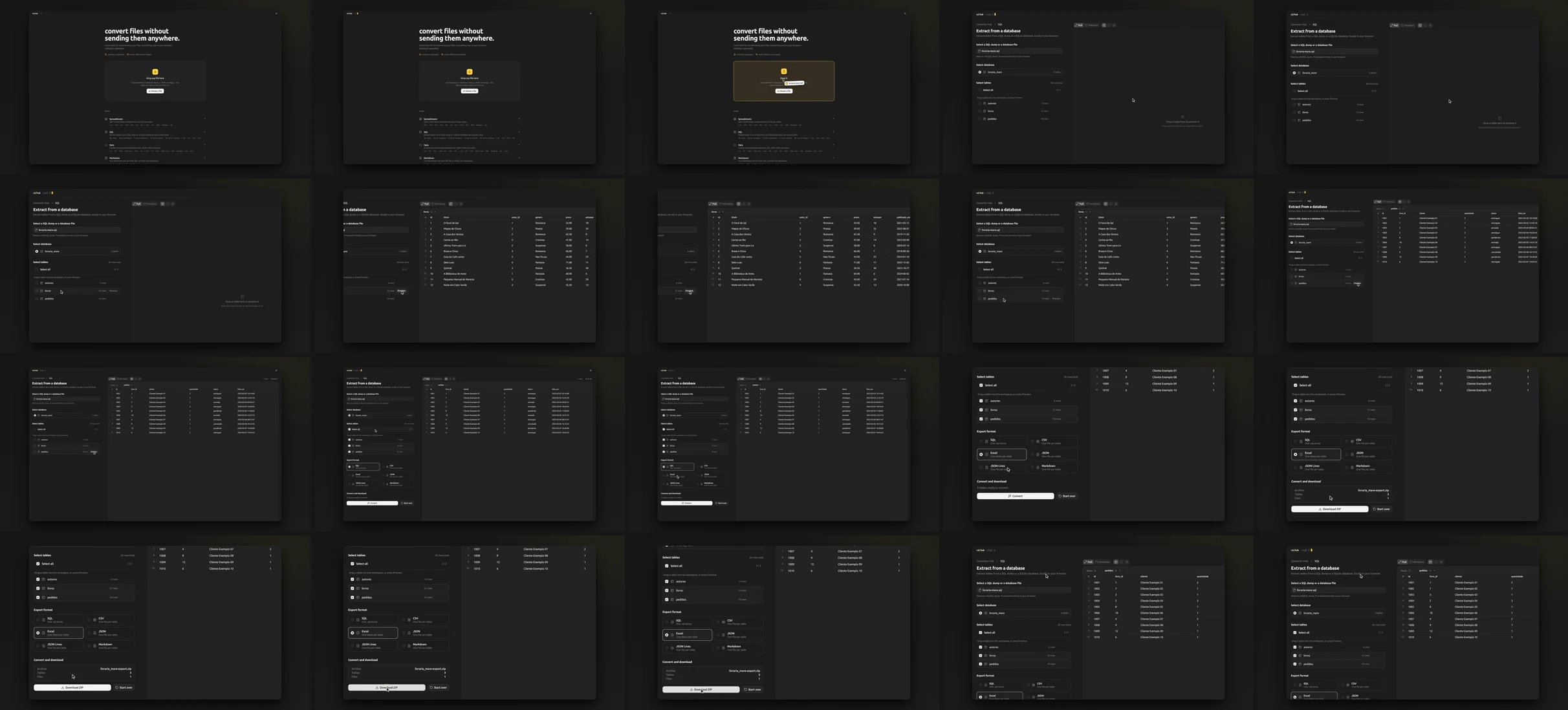
what the review caught#
this was the part that paid off the most.
a color flicker. in cd/ui, opening search (Ctrl K) darkened the whole frame at once. to the eye it looked like a flicker. I measured the average brightness of each frame and found jumps of 4 to 14 points from one frame to the next. I removed the segment that opened and closed a dialog live and, wherever brightness still jumped more than 4, added a 4-frame crossfade (~133 ms). that is editing, not fake UI: the screen stays the same.
a bug in the product. in the cd/ui block preview, switching from desktop to tablet showed ~0.2 s of empty preview. it wasn't the video: the iframe only mounted on click and loaded the whole page from scratch. the skill has a rule for this, "never edit around a broken state", so the fix went into cd/ui: the iframe now preloads when the pointer or focus reaches the device buttons. I captured again and checked the brightness of that region frame by frame: no jumps at all.
a technical detail. Edge's screencast capture ignores deviceScaleFactor and returns CSS pixels. for cd/ui I switched to a 1600x900 viewport placed 1:1 in the frame, with no rescaling, and the text came out sharp.
the same color in every browser. every video is exported as H.264 yuv420p with the full bt709 color tags and +faststart. without the tags, the same file shows different colors in different browsers.
where the plan changed#
the skill was written with a clear split: the AI plans, rehearses and reviews; I record and edit in Recordly. the converter-hub shot list came out in that format, Recordly settings included.
in practice, the three videos in the portfolio today were captured by script, not recorded by hand:
- cd/ui and converter-hub: Playwright drives Edge on the deployed site, a drawn cursor is injected into the page (without changing the site), the browser's screencast becomes a constant 30 fps video and ffmpeg applies the zooms, the frame and the export. in cd/ui, the zooms are anchored to marks recorded during capture, so network variation doesn't throw anything off;
- sentinel-forge: the product is a CLI, so the tool's real output is saved to a JSON file and replayed on an HTML page that draws the terminal frame by frame. the only change to the text was replacing an absolute path with
./rules, and the IPs come from ranges reserved for documentation (RFC 5737).
what didn't change was the rest of the skill: one flow, fictional data, no changes to the product and a frame-by-frame review. that is what made the videos good, not the recording tool. so the skill now has two modes: scripted (the default when the flow runs in a browser) and manual, in Recordly, for when the flow needs native OS UI or hand-made pacing. everything I learned from scripted capture (injected cursor, marks for the zooms, the brightness check, the replayed CLI) is written into it.
as a bonus, since capture is a script, every video exists in both themes with the same script and the same timing. the portfolio shows the dark or light version depending on the reader's theme.
what I learned#
- one good flow beats every feature. the videos got shorter (cd/ui went from 72 to 45 seconds) and explain more.
- rehearsing finds problems before recording. a button below the fold, a click on the wrong button, an empty screen: all of it showed up in the rehearsal, not in the video.
- reviewing frame by frame is the step nobody does. the flicker and the empty preview slip by at normal speed.
- if the demo shows a bug, the bug belongs to the product. fixing it in the project kept the video honest and made cd/ui better.
- don't speed up the main action. the cd/ui video went from 58 to 49 seconds by shortening pauses, without speeding anything up.
the skill lives in my skills repository: github.com/di0rio/cd-skills. the videos are in the case studies for cd/ui, converter-hub and sentinel-forge.